
Improving SEO on WordPress starts with making the correct pages crawlable and indexable, then aligning each page with search intent, improving content quality, strengthening internal relationships, reducing performance problems, building authority, and measuring the results in Google Search Console.
There is no WordPress setting, plugin, schema type, keyword-density percentage, or backlink package that can guarantee higher Google rankings.
That distinction matters.
A WordPress SEO plugin can manage title elements, meta descriptions, canonical URLs, XML sitemaps, robots directives, breadcrumbs, and structured data. It cannot make a weak page become the most useful result for a competitive search.
A common WordPress SEO journey follows the same pattern: users begin with a visibility problem, diagnose an SEO problem, search for a solution, implement individual fixes, select tools, measure results, troubleshoot weak rankings, and eventually decide whether specialist help is justified.
Google’s current Search Essentials follow a similarly broad model. Google recommends technically accessible pages, helpful and reliable people-first content, language searchers actually use, crawlable links, and appropriate optimization of images, structured data, JavaScript, and other page elements. Meeting those requirements still does not guarantee crawling, indexing, or rankings.
So the useful question is not:
Which WordPress SEO plugin gets the highest score?
It is:
What is preventing this specific WordPress page from being discovered, indexed, understood, considered relevant, trusted, and selected for the query I want?
That is the diagnostic model used throughout this guide.
Why Is Your WordPress Website Not Ranking Higher on Google?
A WordPress website usually struggles because of one or more failures across crawlability, indexability, search intent, content quality, site architecture, performance, authority, or measurement.
These are different systems.
A page that is blocked from indexing has an eligibility problem. A page that is indexed but answers the wrong intent has a relevance problem. A useful page stuck below stronger competitors may have an authority or competitive-quality problem.
Treating all three as “an SEO problem” makes diagnosis unnecessarily difficult.
A practical WordPress SEO framework connects the same major systems:
WordPress SEO → Technical SEO → On-Page SEO → Content SEO → Site Architecture → Performance Optimization → Off-Page SEO → SEO Measurement.
Can Google Crawl and Index the Correct Pages?
Check indexability before changing keywords, content length, backlinks, or plugin settings.
Google first needs access to an eligible URL before that URL can compete normally in Search.
In WordPress, common failures include an accidentally enabled search-engine visibility setting, a noindex directive on an important page, an incorrect canonical URL, blocked crawler access, duplicate archive URLs, broken internal links, or sitemap problems.
The sequence is:
WordPress URL → discovery → crawl → processing → index eligibility → ranking systems → search result
Do not confuse robots.txt with noindex.
robots.txt primarily manages crawler access. A noindex directive manages whether a supported page should remain out of Google’s index. This distinction is especially important in WordPress SEO.
Google also warns that blocking crawling through robots.txt does not necessarily prevent a URL from being indexed if Google discovers that URL elsewhere.
That is why ‘I blocked it in robots.txt’ and ‘I removed it from Google’ are not equivalent statements Persistent crawlability, indexation, canonical, sitemap, or rendering problems may require a deeper technical SEO review
Is WordPress Generating More URLs Than You Actually Need?
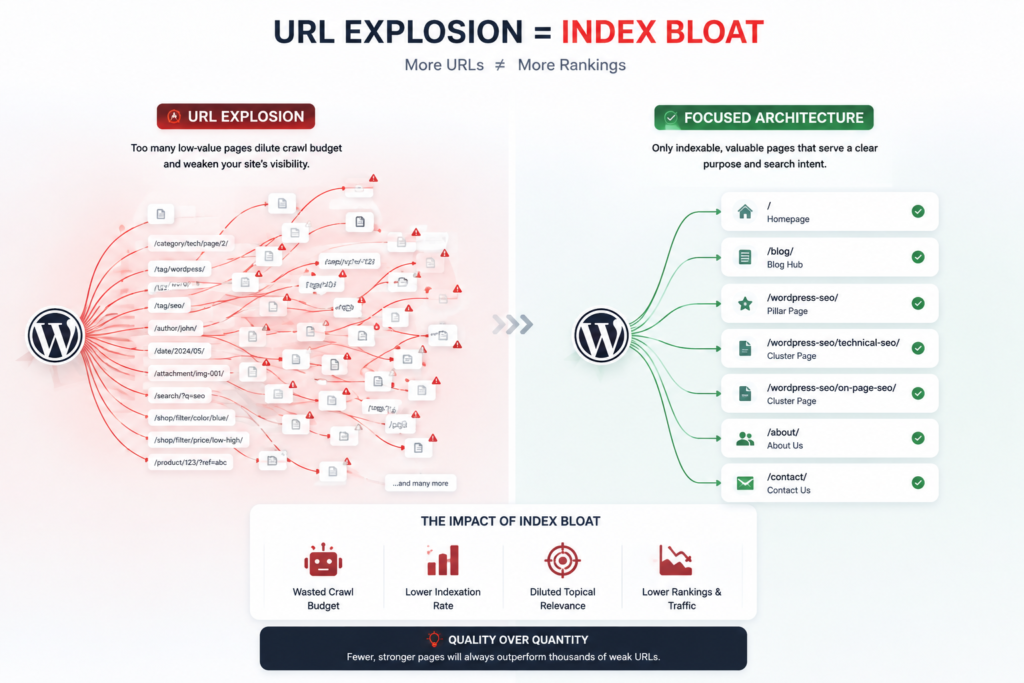
WordPress can create useful taxonomies and archives, but uncontrolled categories, tags, attachment pages, author archives, pagination, parameters, and ecommerce filters can expand the crawlable URL set without adding equivalent search value.
The issue is not that WordPress categories or tags are inherently bad.
The issue is whether each indexable URL has a clear purpose.
A useful category page can organize a real topic cluster.
A tag archive containing three short excerpts and no unique value may be another URL Google has to discover, interpret, canonicalize, and decide whether to index.
This creates an important contrast:
useful taxonomy ↔ taxonomy bloat
intentional archive ↔ thin archive
canonical page ↔ duplicate URL
focused architecture ↔ index bloat
Google’s current guidance for generative AI search also recommends reducing unnecessary duplicate content because duplicate URLs can waste crawling resources and provide a weaker experience.
Does the Page Match What the Searcher Actually Wants?
Search intent determines the type, format, depth, and task a page should satisfy.
Consider the query:
how to change a WordPress password
The expected answer is procedural.
The user needs the steps, the location of the setting, alternative methods when access is lost, and troubleshooting when the normal method fails.
They do not need a 1,400-word introduction explaining the history of passwords.
That sounds obvious, yet this is where a large amount of SEO content fails.
The author sees a keyword.
Google sees a query attached to a user task.
The correct semantic path is:
query → intent → expected answer → page type → information structure → task completion
For this topic, search intent is especially important because the primary reader usually already owns or manages a WordPress website and needs a practical optimization process rather than a definition of SEO.
Are Several WordPress Pages Competing for the Same Intent?
Keyword cannibalization occurs when multiple pages substantially overlap in the search need they are trying to satisfy.
Imagine a site has:
/wordpress-seo-guide/
/wordpress-seo-tips/
/how-to-improve-wordpress-seo/
/wordpress-seo-best-practices/
Those URLs are not automatically a problem because their keywords look similar.
They become a problem when the pages answer essentially the same search intent with similar information.
In that case, the site may be maintaining four mediocre destinations where one substantially better resource would provide clearer value.
The remedy may involve consolidation, internal-link changes, redirects, content differentiation, or canonicalization depending on what each URL actually represents.
The principle is simple:
Do not publish another URL merely because another keyword variation exists.
Google’s 2026 guidance for generative AI search explicitly warns against creating separate pages for every possible query variation primarily to manipulate rankings. Google’s systems can understand synonyms and related meanings without requiring a page for every long-tail phrase.
That is particularly relevant to old WordPress sites built under the “one keyword, one blog post” model.
Eventually, somebody has to maintain the landfill.
What Should You Fix First in WordPress SEO?
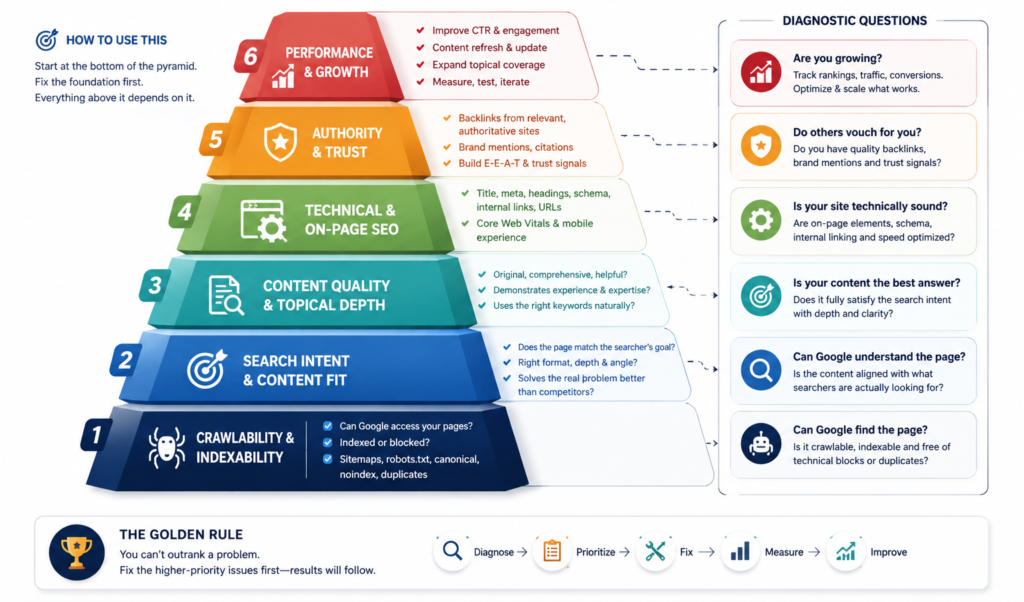
Fix eligibility and intent before polishing lower-impact details.
A useful default diagnostic sequence is:
| Priority | SEO System | What to Verify |
| 1 | Crawlability and indexability | Can Google access and index the intended URL? |
| 2 | Search intent | Does the page satisfy the task behind the query? |
| 3 | Content value | Does the page provide complete, accurate, differentiated information? |
| 4 | Cannibalization and architecture | Is one clear page responsible for the main intent? |
| 5 | On-page signals | Are titles, headings, URLs, links, and media descriptive? |
| 6 | Performance and mobile UX | Can visitors use the page efficiently across devices? |
| 7 | Authority and trust | Are expertise, evidence, citations, and external references sufficient? |
| 8 | Measurement | Can you prove whether the changes improved search and business outcomes? |
This is a diagnostic sequence, not a Google ranking-factor hierarchy. The correct starting point depends on evidence from the affected URL, query, and site.
This order prevents a common WordPress SEO failure: spending three hours making an SEO plugin’s indicators green while the page itself has the wrong intent, weak information, no internal links, or an indexing problem.
In practice, site owners often move from asking for more SEO tactics to asking a more useful question:
Which actions matter most?
Start there.
How Do You Make Sure Google Can Crawl and Index a WordPress Website?
Verify WordPress visibility settings, crawler directives, sitemap coverage, canonical URLs, internal links, HTTP responses, and actual index status in Google Search Console.
Start inside WordPress.
Go to:
Dashboard → Settings → Reading
Check the setting that discourages search engines from indexing the site.
This setting is useful on staging and development websites.
It is not useful when somebody forgets to turn it off after launch.
Then inspect the actual important URLs rather than assuming the entire site shares the same index status.
How Should You Use a WordPress XML Sitemap?
Use the sitemap to expose important canonical URLs for discovery; do not treat sitemap inclusion as proof that a page is indexed or deserves to rank.
Modern WordPress includes native XML sitemap functionality, including wp-sitemap.xml and sitemap indexes for content types such as posts, taxonomies, and users. These are WordPress features rather than capabilities that exist only inside SEO plugins.
A sitemap communicates URLs.
It does not repair thin content.
It does not override a noindex.
It does not force Google to select your declared canonical.
And it does not guarantee indexing.
Google’s Search Essentials explicitly states that meeting technical requirements and best practices does not guarantee crawling, indexing, or serving.
Submit and monitor the sitemap in Google Search Console, then use URL Inspection and indexing reports when the numbers do not make sense.
How Should Canonical URLs Work?
A canonical tells search engines which representative URL you prefer when multiple URLs contain duplicate or highly similar content.
Typical WordPress duplication can appear through archives, tracking parameters, ecommerce filters, print URLs, HTTP/HTTPS variants, or inconsistent domain versions.
The conceptual model is:
duplicate URL set → canonical signals → representative URL → consolidated search signals
A canonical is not a substitute for clean architecture.
If 20 unnecessary URLs exist only because the site’s configuration keeps generating them, the better solution may be preventing unnecessary crawl paths rather than attaching another bandage to every URL.
Should You Change WordPress Permalinks on an Existing Site?
Do not change established URLs merely because another permalink format looks cleaner.
For a new site, a concise descriptive URL structure is straightforward to establish.
For an established site, every changed URL can affect internal links, external links, redirects, analytics, canonical references, and existing search signals.
If the business value of the migration does not justify that complexity, leave stable URLs alone.
If the change is necessary, implement permanent redirects from the old URLs to the most relevant replacements and update internal links.
Google recommends logical, crawlable URL structures that are understandable to users and crawlers.
The useful rule is not “short URLs always rank better.”
It is:
Create understandable URLs early; change established URLs only for a defensible reason.
How Do You Improve WordPress Page Speed and Core Web Vitals?
Measure the bottleneck first, then reduce unnecessary server, theme, plugin, script, media, and database overhead.
Installing optimization plugin number 38 is not a performance strategy.
A WordPress page can be slow because of its hosting environment, PHP execution, database queries, theme, page builder, third-party scripts, font loading, oversized images, caching configuration, JavaScript execution, or a combination of several problems.
The useful diagnostic model is:
| Entity | Attribute | Example Problem |
| Hosting | server response | slow backend response |
| Theme | asset weight | excessive CSS or JavaScript |
| Page builder | DOM and scripts | unused widgets loaded globally |
| Plugin | requests or queries | redundant functionality |
| Image | dimensions and bytes | oversized hero media |
| Database | stored data | revisions, expired transients, unused tables |
| Cache | delivery | dynamically rebuilt pages |
| Third-party script | execution cost | chat, analytics, ads, trackers |
Google’s current Core Web Vitals measure loading performance, responsiveness, and visual stability. The recommended “good” thresholds are LCP within 2.5 seconds, INP below 200 milliseconds, and CLS below 0.1.
Those values should be measured, not guessed.
Do Good Core Web Vitals Guarantee Higher Rankings?
No. Good Core Web Vitals contribute to page experience, but perfect scores do not guarantee top Google rankings.
Google explicitly says there is no single page-experience signal and warns against pursuing perfect scores purely for SEO. Relevance can still outweigh page-experience differences.
So do not spend two weeks moving a Lighthouse score from 97 to 100 while the service page does not answer the query.
Fix meaningful performance failures.
Then move on.
How Should You Optimize WordPress Images?
Resize images to the displayed dimensions, compress their file size, choose efficient formats where appropriate, lazy-load suitable below-the-fold media, and write alt text that describes meaningful visual information.
Separate performance from accessibility.
An image can be compressed and still have terrible alt text.
An image can have perfect alt text and still be a 4 MB JPEG.
Useful image SEO involves several attributes:
image → dimensions → file size → format → compression → loading behavior → filename → alt text → surrounding context
Do not turn alt text into a keyword container.
If an image shows a WordPress Search Engine Visibility setting being disabled, describe that visual information.
Do not write:
WordPress SEO best SEO WordPress rankings Google SEO plugin best WordPress SEO.
That helps nobody.
What About Mobile SEO?
A responsive site should preserve readable content, usable navigation, logical layouts, and stable interactions across smaller screens.
Google’s page-experience guidance asks whether content displays well on mobile devices, avoids excessive ads, avoids intrusive interstitials, and keeps the main content easy to distinguish.
Harvard’s Digital Accessibility guidance also recommends logical content order and layouts that remain usable as viewport size, zoom, or font size changes.
Mobile responsiveness therefore belongs to both SEO and usability.
How Do You Choose Keywords That a WordPress Site Can Realistically Rank For?
Choose keywords by combining relevance, search intent, observable demand, ranking feasibility, and business value rather than using search volume alone.
A practical decision model is:
Keyword Opportunity = Relevance × Intent Fit × Demand × Ranking Feasibility × Business Value
This is a prioritization framework, not a Google ranking formula.
The multiplication matters conceptually.
If business relevance is close to zero, a large search-volume number does not rescue the opportunity.
If the query matches a valuable service, has realistic competition, and closely reflects what your customers need, a smaller keyword can produce more useful results than a broad term with ten times the volume.
Should You Target a Separate Page for Every Keyword?
No. Map queries to search intent first, then decide which queries belong on the same page.
A primary keyword describes the central query or topic.
Secondary keywords, long-tail queries, synonyms, entities, attributes, and related questions expand the same context when they satisfy the same underlying task.
A broader relationship is:
search intent → keyword research → topical coverage → entity coverage → information gain → originality → expertise → trust.
That is a better model than counting how many times an exact phrase appears.
Google’s current Search Essentials recommends using words people would use to find the content in prominent places such as the title, main heading, link text, and appropriate alt text. It does not prescribe keyword-density targets.
The green traffic light is not a ranking factor.
Neither is making the plugin emotionally satisfied.
How Do You Build Topical Authority?
Build a coherent network of useful pages around real subtopics, then connect those pages through descriptive internal links and logical architecture.
The semantic structure should move from broader concepts to narrower attributes.
For example:
WordPress SEO
→ Technical SEO
→ Crawlability
→ Indexability
→ XML sitemaps
→ Canonicalization
and:
WordPress SEO
→ Content SEO
→ Search intent
→ Keyword research
→ Content quality
→ Internal linking
→ Content updates
Each supporting page should have a distinct job.
That creates a topic cluster.
Publishing 60 almost identical posts targeting 60 keyword variations creates maintenance debt.
Those are not the same strategy.
What Makes WordPress Content Helpful Enough to Compete in 2026?
Useful content should satisfy the user’s task while adding original information, first-hand experience, evidence, analysis, examples, or decision guidance that is not simply copied from existing results.
This point has become more explicit.
Google’s generative AI optimization guide, updated July 10, 2026, specifically recommends creating non-commodity content. It describes stronger content as work that adds unique expertise, experience, or perspective rather than simply recycling information that already exists online.
That directly applies to WordPress SEO articles.
Another article saying:
Install Yoast. Use keywords. Improve speed. Build backlinks.
adds almost no information gain.
A stronger article explains:
- exactly where an indexability setting is located;
- when changing an established permalink is a bad decision;
- how to distinguish crawl failure from index exclusion;
- what to consolidate when two URLs compete for the same intent;
- how to verify each change in Search Console.
The distinction is:
generic advice → implementation context
repeated information → information gain
tool recommendation → decision rule
claim → evidence
SEO activity → measurable outcome
High-value information-gain opportunities include technical audit workflows, archive problems, new-versus-established-site distinctions, Search Console verification, before-and-after examples, and warnings about changing established URLs without redirects.
Can AI-Generated Content Rank on Google?
AI-assisted content is not automatically disqualified, but scaled or automated content created primarily to manipulate rankings can violate Google’s spam policies.
Google’s current generative-AI guidance says AI can assist with research and content structure. It also states that generating many pages without adding user value can fall under scaled content abuse.
The useful distinction is therefore:
AI assistance ↔ automated search manipulation
and:
original value ↔ scaled commodity content
If AI drafts a technical explanation, verify it.
If AI names a WordPress setting, check the setting.
If AI cites a statistic, confirm the source.
If AI produces 900 city pages with only the city name changed, do not expect the phrase “AI-generated” to be the main problem. The missing value is the problem.
Google’s spam policy applies to scaled low-value content regardless of whether it is produced by AI, humans, or a combination of both.
How Should You Optimize Titles, Meta Descriptions, Headings, and URLs?
Use each on-page element to clarify what the page contains, which task it satisfies, and how its sections relate to the main topic. Together, these elements form the foundation of effective on-page SEO, helping search engines and users understand the page’s topic, structure, and purpose.
Start with the title.
A title should identify the page precisely enough that a searcher can distinguish it from other results.
Avoid boilerplate.
Avoid stuffing variants of the same keyword.
Avoid making every article look like:
WordPress SEO | Best WordPress SEO | WordPress SEO Tips | SEO WordPress
Google recommends descriptive, concise title elements and specifically warns against keyword stuffing and repeated boilerplate titles.
Why Does Google Sometimes Rewrite Search Titles?
Google creates title links automatically from multiple page and web signals, so the displayed result does not have to match your HTML <title> exactly.
Potential sources include the title element, main visual heading, heading elements, prominent page text, og:title, anchor text, and links pointing to the page.
So when Google rewrites a title, do not immediately add another plugin.
First inspect whether the page sends conflicting title signals.
How Should Headings Be Structured?
Use headings to represent information hierarchy rather than to decorate text or insert keywords.
For this article:
H1: How to Improve SEO on WordPress for Higher Google Rankings
Then H2 sections represent major components such as crawlability, performance, content, architecture, authority, and measurement.
H3 sections resolve narrower questions beneath those components.
Harvard’s Digital Accessibility guidance states that headings help users identify content quickly and that heading levels should reflect the actual structural depth of sections and subsections.
That gives headings two jobs:
navigation + information architecture
A heading such as:
Internal Linking
is understandable.
A heading such as:
How Should You Build Internal Links Between WordPress Pages?
communicates more of the actual question being resolved.
Does the Meta Description Improve Rankings?
A meta description is primarily a search-result summary rather than a direct ranking signal. Its practical SEO value comes from accurately communicating what the page offers and potentially influencing whether a searcher chooses to click.
Describe the page’s value accurately.
Use the main topic naturally when it improves clarity.
Avoid duplicating the same description across hundreds of pages.
The goal is to make the result understandable before the click.
How Should Internal Linking Work on a Growing WordPress Site?
Internal links should connect semantically related pages, expose important URLs to crawlers, help users move between related tasks, and clarify the site’s information hierarchy.
When you publish a new page, do not only add links from that page to older content.
Go back to established relevant pages and identify places where a link to the new page genuinely helps the reader.
That creates two-way topical relationships.
For example:
WordPress SEO guide
→ WordPress sitemap guide
→ Core Web Vitals guide
→ internal linking guide
→ canonical URL guide
Then those supporting resources can link back to the parent guide when the broader context is useful.
What Anchor Text Should You Use?
Use anchor text that describes the destination rather than generic phrases such as “click here” or “read more.”
Google states that links help it discover pages and determine relevance, while descriptive anchor text helps both users and Google understand the destination.
If the linked page is titled:
How to Fix WordPress Indexing Problems
then natural anchors can include:
fix WordPress indexing problems
or:
WordPress indexing problems
when those phrases fit the sentence.
Do not force the exact same anchor into every link.
What Is an Orphan Page?
An orphan page is a URL with no meaningful internal-link path pointing to it from the site’s normal architecture.
A sitemap can expose that URL.
A sitemap does not create contextual relevance between that URL and related pages.
This distinction matters:
sitemap relationship = discovery
contextual internal link = discovery + semantic relationship + user navigation
That is why strong site architecture cannot be replaced by XML.
Does Schema Markup Improve WordPress SEO?
Structured data helps Google understand explicitly marked information and can make eligible pages available for supported rich-result features, but schema does not convert weak content into a strong ranking result.
Use structured data that accurately represents content visible on the page, and distinguish between valid Schema.org markup and structured data types that currently support Google Search features.
Not every valid schema type produces a Google rich result.
For example, Google stopped showing FAQ rich results in Search starting May 7, 2026, and HowTo rich results were deprecated in September 2023.
Check Google’s current Search Gallery before implementing structured data primarily for a search-result enhancement.
Do not attach unrelated structured data types to a generic landing page because “more schema must mean more SEO.”
It does not.
Google’s generative AI optimization guide also states that structured data is not required for generative AI search and that no special Schema.org markup is needed for those features.
WordPress introduces another practical problem: duplication.
Your SEO plugin may output schema.
Your theme may output schema.
WooCommerce may output product markup.
A separate schema plugin may add another graph.
The goal is not the largest JSON-LD file.
The goal is accurate structured information.
Validate what the rendered page actually produces with Google’s Rich Results Test when the markup is intended for a supported Google rich-result feature.
How Do Backlinks and Authority Affect WordPress Rankings?
Relevant external references can strengthen a site’s ability to compete, but link quality depends on relevance, legitimacy, context, and editorial value rather than a third-party authority score alone.
Links still belong in the WordPress SEO system.
They just belong after basic eligibility and page quality have been addressed.
A blocked page with 50 backlinks is still a technical problem.
A thin page with 500 directory links is still a thin page.
A useful page in a competitive niche may still require external authority to compete with established domains.
The contrast is:
editorial mention ↔ automated link placement
relevant referring page ↔ unrelated directory
earned citation ↔ mass backlink package
industry relationship ↔ link spam
Google’s spam policies prohibit manipulative link practices and other attempts to deceive Search systems.
So if somebody sells “50,000 high-DA backlinks” for the price of lunch, the cheap price is not the surprising part.
The surprising part would be expecting that to become a defensible authority strategy.
How Do E-E-A-T and Trust Signals Apply to WordPress?
Show who created the content, why they are qualified to discuss the subject, what evidence supports important claims, and what real organization or person stands behind the website.
E-E-A-T means:
Experience → Expertise → Authoritativeness → Trustworthiness
Google states that E-E-A-T itself is not a specific ranking factor. Instead, its systems use multiple signals that can align with these qualities, with trust being particularly important.
That distinction prevents another false SEO checklist:
Add an author bio = +10 rankings.
No.
An author bio is useful when it helps the reader evaluate who produced the information and whether that person has relevant experience or expertise.
For trust-sensitive subjects, examples include medical, legal, financial, and safety information.
Evidence matters more as consequences increase.
Which Website Trust Signals Should You Add?
Use verifiable authorship, citations, business identity, clear contact information, editorial accountability, and accurate updates when those elements are relevant to the website.
Stanford University’s Web Credibility Project produced guidelines based on research involving more than 4,500 participants. Its recommendations include making claims verifiable, showing the real organization behind a website, highlighting relevant expertise, making contact information easy to find, maintaining useful design, and keeping information current.
That creates a useful trust sequence:
claim → source
content → author
author → credentials
website → organization
organization → contact information
old information → review/update
This is more defensible than adding a random “Trust us, we are experts” badge.
Should You Update, Merge, Redirect, or Delete Old WordPress Content?
Choose the action based on whether the existing URL still has a useful purpose, search demand, links, traffic, or a distinct intent.
Not every underperforming article should be deleted.
Not every old article should be refreshed.
And changing the publication date while leaving the content untouched is not meaningful maintenance.
Use four different actions.
| Existing Page State | Appropriate Action |
| Useful intent, outdated information | Refresh |
| Strong overlap with another page | Consolidate |
| Obsolete URL with a clear replacement | Redirect |
| No useful purpose and no suitable replacement | Remove where appropriate |
When Should You Consolidate Content?
Consolidate when multiple weak pages compete for substantially the same search intent and one stronger resource can satisfy the task more completely.
This addresses cannibalization while reducing maintenance.
For example, several weak pages targeting variations of “WordPress SEO tips,” “WordPress SEO guide,” and “how to improve WordPress SEO” may be consolidated into one comprehensive resource if they genuinely serve the same search intent.
After consolidation, update internal links and redirect obsolete URLs where appropriate.
What Is Content Decay?
Content decay occurs when a once-useful page becomes less competitive because information, search expectations, competitors, products, statistics, screenshots, or the underlying topic changed.
Refresh facts that actually changed.
Update obsolete screenshots.
Remove discontinued tools.
Add missing subtopics when the search task has expanded.
Do not add 700 words merely to make the article longer.
Google says there is no ideal page length for generative AI search and recommends creating pages for the audience rather than formatting content for AI systems.
Which WordPress SEO Plugin Should You Use?
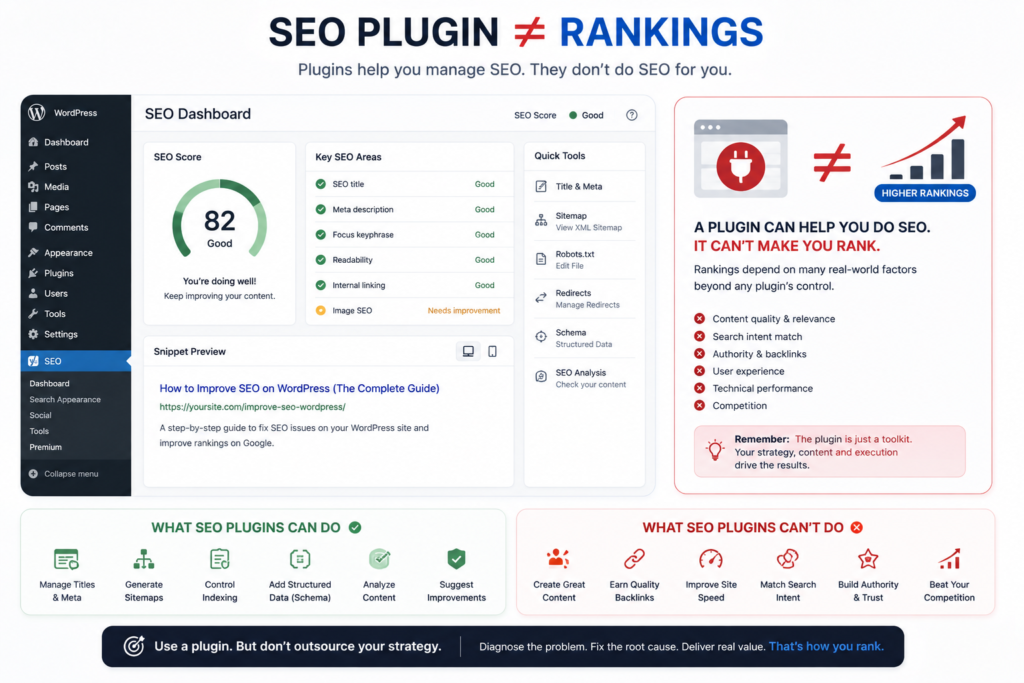
Use one primary SEO plugin that provides the controls you actually need, then avoid overlapping plugins that generate conflicting metadata, canonicals, schema, sitemaps, or robots directives.
Common options include Yoast SEO, Rank Math, All in One SEO, and SEOPress.
The specific brand is secondary to correct implementation.
The relationship is:
WordPress → SEO plugin → metadata / sitemap / schema / indexation controls
and explicitly rejects:
SEO plugin → automatic rankings.
That needs to be understood before comparing plugin feature tables.
Does a 100/100 SEO Plugin Score Mean the Page Is Optimized?
No. A plugin score measures the plugin’s predefined checks; it does not measure whether Google considers your page the best available result for a query.
A tool may check whether the phrase appears in:
- a title;
- a heading;
- a description;
- the copy.
Google still has to evaluate a much broader search environment.
That includes query relevance, content usefulness, page relationships, authority, competition, search context, technical accessibility, and many other systems.
So do not rewrite a natural sentence into nonsense simply because the plugin wants the exact keyword one more time.
“Keyword density: perfect” is not particularly useful when the article sounds like:
WordPress SEO services improve WordPress SEO because our WordPress SEO experts provide the best WordPress SEO services.
Write for the person performing the search.
Use the plugin to manage the implementation details.
How Do You Measure Whether WordPress SEO Is Actually Improving?
Measure search visibility, user acquisition, and business outcomes rather than tracking rankings alone.
Google Search Console gives you page and query data such as impressions, clicks, click-through rate, average position, and index status.
For visibility in Google’s generative AI features, use the Generative AI performance report in Search Console where it is available in your account, alongside standard query, page, indexing, and conversion analysis.
The measurement path should be:
optimization → Google recrawl/reprocessing → impressions → clicks → qualified visits → conversion → business outcome
Businesses that need these metrics consolidated can use structured SEO reporting to connect Search Console, GA4, rankings, traffic, and conversion performance.
A ranking improvement without useful traffic may have little commercial value.
More traffic without enquiries, sales, bookings, leads, subscriptions, or another business objective may indicate weak intent alignment.
The desired progression is:
higher rankings → more visibility → more qualified traffic → more enquiries → more customers → more revenue.
SEO is the mechanism.
The business outcome is the reason.
Which Pages Should You Improve First?
Prioritize pages that already show evidence of demand but underperform on clicks, position, intent satisfaction, or conversion.
A page receiving substantial impressions but few clicks may need investigation into its title link, snippet, query relevance, or SERP competition.
A page near competitive positions may deserve deeper improvement before you publish another unrelated article.
A page receiving traffic but no commercial action may have a conversion or intent problem rather than a visibility problem.
Map WordPress optimization work directly to Search Console measurement rather than treating implementation as the finish line.
Why Did Your WordPress Rankings Suddenly Drop?
Start with the affected dates, pages, queries, search types, index status, technical changes, and SERP changes before blaming an algorithm update.
Do not diagnose:
Traffic fell. Google must have penalized us.
That is not enough evidence.
Google’s current core-update guidance recommends comparing performance before and after the update, reviewing the pages and queries affected, distinguishing small position changes from large sustained drops, and analyzing search types separately.
A useful diagnostic sequence is:
date of decline → affected directory → affected pages → affected queries → index status → technical changes → content changes → competitor/SERP changes → confirmed Google updates
If the cause is still unclear after these checks, a comprehensive SEO audit can help identify whether the decline is caused by technical, content, authority, or site-architecture issues
Check for practical causes such as:
- accidental noindex;
- failed redirects;
- changed canonicals;
- hacked pages;
- site migrations;
- deleted content;
- server failures;
- internal-link changes;
- intent shifts;
- stronger competitors.
Then consider confirmed algorithm changes.
What About Helpful Content Updates?
There is no separate Helpful Content Update system to optimize for in 2026.
Google says the helpful content system, originally announced in 2022, became part of its core ranking systems in March 2024. Google subsequently moved the historical helpful content system into the retired systems section of its ranking-systems documentation.
So do not build a strategy around “recovering from HCU” as though one isolated switch still exists.
Focus on what Google currently documents:
helpful content + reliability + relevance + technical accessibility + good page experience + spam-policy compliance
Google also states that some improvements can appear within days, while broader reassessment can take months, and no improvement guarantees a particular ranking outcome.
How Does WordPress SEO Apply to Local Businesses?
Local businesses should connect their WordPress content architecture to the real services and geographic areas they genuinely serve rather than generating large numbers of interchangeable city pages.
A useful local structure might include:
business → primary service → service variant → legitimate location → supporting evidence → contact/conversion action
A weak structure looks like:
SEO template → replace city variable → publish 400 URLs
Changing “Manchester” to “Leeds” does not create local information gain.
A useful location page may include genuinely location-specific service details, operating coverage, customer evidence, relevant projects, local regulations where applicable, travel/service constraints, photographs, directions, and accurate business information.
Do not publish:
Residents of Birmingham have understood the importance of roofs for many years.
The sentence is technically possible.
It is also information nobody needed.
Google’s scaled-content policy targets large amounts of low-value content created primarily to manipulate search rankings, regardless of whether that content was produced through automation or manual processes.
What Changes for WooCommerce SEO?
WooCommerce adds ecommerce-specific entities such as product pages, category pages, variations, faceted navigation, product schema, inventory, dynamic URLs, and database-intensive functionality.
The same macro SEO systems still apply.
The implementation becomes more complex.
For example:
product → category → filter → variation → URL parameter → canonical/index decision
Thin manufacturer descriptions create another problem.
If 300 retailers publish the same manufacturer description, your version contributes little differentiation.
Useful ecommerce information gain can include original specifications, testing, comparisons, sizing guidance, compatibility information, photographs, videos, shipping information, FAQs, and customer-relevant decision support.
The correct principle remains:
add information the buyer needs that competing copies do not provide.
Can You Improve WordPress SEO Without Paying for Expensive Tools?
Yes. Many foundational WordPress SEO tasks can be completed with WordPress itself, Google Search Console, performance-testing tools, manual SERP analysis, and a correctly configured SEO plugin.
Paid tools can make large-scale research, crawling, backlink analysis, keyword discovery, and competitive analysis more efficient.
They do not change the underlying logic.
The website still needs:
crawlability → indexability → relevance → useful content → architecture → performance → authority → measurement
That same process is a stronger alternative to another generic WordPress tips article.
Should You Do WordPress SEO Yourself or Hire a Specialist?
Handle routine on-page work yourself when you understand the implementation and can verify the result; use specialist help when the diagnosis involves technical risk, scale, migrations, persistent ranking loss, or unclear causality.
| Situation | DIY Is Often Reasonable | Specialist Review Is More Appropriate |
| Editing titles and descriptions | ✓ | |
| Writing descriptive internal links | ✓ | |
| Basic Search Console monitoring | ✓ | |
| Submitting a sitemap | ✓ | |
| Site-wide indexing failure | ✓ | |
| Complex canonical conflicts | ✓ | |
| Large site migration | ✓ | |
| Severe ranking decline | ✓ | |
| Hacked-site spam | ✓ | |
| Large WooCommerce architecture | ✓ | |
| Major keyword cannibalization | ✓ | |
| JavaScript rendering problems | ✓ | |
| International hreflang problems | ✓ |
A specialist does not become necessary because WordPress SEO is mysterious.
A specialist becomes useful when the cost of diagnosing the problem incorrectly becomes higher than the cost of obtaining qualified help.
What Is a Practical 30-Day WordPress SEO Plan?
Use the first month to establish technical eligibility, repair high-impact weaknesses, improve existing opportunities, and create a measurement baseline before expanding content production.
| Period | Primary Focus | Main Outcome |
| Days 1–5 | Crawlability, indexing, Search Console, sitemap, canonicals, HTTPS | Verify ranking eligibility |
| Days 6–10 | Performance, mobile UX, images, themes, plugins | Remove major experience bottlenecks |
| Days 11–15 | Keyword-to-page mapping and search intent | Reduce targeting errors |
| Days 16–20 | Existing content, cannibalization, consolidation | Improve current assets |
| Days 21–25 | Titles, headings, internal links, images, schema | Strengthen page understanding |
| Days 26–30 | Authority gaps, conversions, Search Console review | Establish the next priority cycle |
Do not measure success on day 30 by asking:
Are we number one yet?
Measure whether:
- important pages are indexable;
- technical failures decreased;
- relevant impressions are increasing;
- pages are reaching better-matched queries;
- click-through performance improved where applicable;
- qualified organic visits increased;
- business conversions are being recorded.
Rankings are an intermediate metric.
Customers, enquiries, sales, subscriptions, bookings, and other real outcomes are closer to the objective.
Frequently Asked Questions About Improving SEO on WordPress
What Is the Fastest Way to Improve WordPress SEO?
Fix major indexing problems first, then improve pages that already receive relevant impressions before creating large amounts of new content.
This concentrates effort where Google has already discovered demand or page relevance.
Is Yoast or Rank Math Better for Rankings?
Neither plugin automatically creates higher rankings; choose the tool whose metadata, sitemap, schema, robots, redirect, and workflow controls best fit your WordPress setup.
The implementation matters more than the brand name.
How Long Does WordPress SEO Take to Work?
Some technical or page-level changes can be processed within days, while broader search reassessment may take weeks or months; Google does not guarantee a ranking improvement after changes.
How Many Keywords Should You Use on a WordPress Page?
Use as many relevant terms, entities, attributes, synonyms, and query variations as needed to explain the topic completely; do not optimize toward an arbitrary keyword count or density.
Google’s current AI-search guidance explicitly says its systems understand synonyms and general meanings, so separate pages or repetitive wording are not required for every query variation.
Does WordPress Rank Better Than Other CMS Platforms?
WordPress can provide a strong SEO implementation environment, but the CMS alone does not determine rankings; technical configuration, content quality, architecture, authority, and competition still matter.
Do You Need Schema on Every WordPress Page?
No. Add supported structured data when it accurately represents the page and provides a legitimate search-feature use case.
More schema is not automatically better schema.
The WordPress SEO Principle That Matters Most
Stop searching for a magic WordPress setting and improve the website as a complete search system.
Make important URLs accessible.
Keep the correct pages indexable.
Match each page to a real search intent.
Publish information worth finding.
Connect related pages.
Remove unnecessary duplication.
Keep the site usable on mobile devices.
Fix meaningful performance problems.
Show who created the content and why the information should be trusted.
Earn legitimate external references.
Then measure whether those improvements produce better search visibility and better business outcomes.
That is more durable than chasing plugin scores, exact keyword densities, schema counts, AI-search hacks, or whichever SEO trick happens to be circulating this month.
Google’s generative AI optimization guide, updated July 10, 2026, makes the direction unusually explicit: foundational SEO still applies, technical clarity still matters, and the stronger long-term opportunity is unique, helpful, reliable, non-commodity content, not another layer of tactics designed only for machines.
The full context vector is therefore:
WordPress website → crawlability → indexability → search intent → keyword targeting → content quality → on-page optimization → site architecture → internal linking → performance → mobile usability → structured data → authority → trust → content maintenance → measurement → conversions
That is WordPress SEO.
Everything else is an implementation detail.
Still Not Sure What Is Holding Back Your WordPress Rankings?
If your important pages are indexable, your content matches the query, your site is technically healthy, and rankings still remain weak, diagnose the site at the URL, query, content, architecture, authority, and conversion levels before publishing more articles or installing more plugins.
A proper SEO audit should identify:
what is failing → where it is failing → why it matters → what should be fixed first → how the fix will be verified
That turns SEO from a collection of recommendations into a measurable improvement process.
Get a WordPress SEO Audit and Find the Ranking Bottlenecks Before You Spend More Time on the Wrong Fixes.